How to Launch an MVP in 90 Days: Complete Startup Guide
By Ekam | August 6, 2025
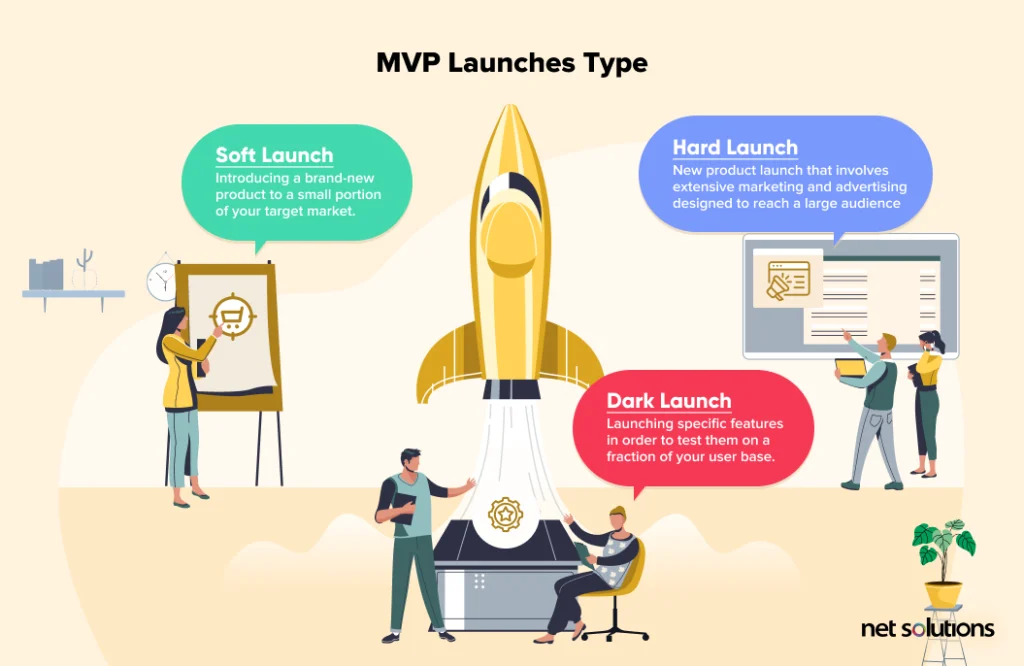
In today’s fast-moving digital world, launching your product quickly is very important. If you're slow, someone else might capture the market before you. That’s why businesses use something called an MVP, which means Minimum Viable Product.
An MVP is a basic version of your product that includes only the most important features. It helps you test your idea with real users, collect feedback, and improve your product without spending too much time or money in the beginning.
The 90-Day MVP Launch Plan:
Phase 1 (Days 1–15): Discovery & Planning
Before you start building anything, you need a solid plan. These first 15 days are all about understanding the problem, defining what you’re going to build, and how success will be measured.
Step 1: Define the Problem You’re Solving
Before you even think about designing screens or writing code, the first and most important step is to deeply understand the problem you are solving. This isn’t just a formal exercise, it's the foundation of your entire product. If you identify the problem, you may end up building a beautiful solution for a problem no one actually has.
Why is this step important?
When you understand the problem clearly:
* You build faster (no confusion)
* You build smarter (you’re solving the right thing)
* You can market more effectively (users understand the value quickly)
Who is your target user?
Your product is not for “everyone.” It’s for a specific group of users who have a specific need.
What is the core problem they face?
Now that you’ve identified your user, go into their problems and understand what’s bothering them. Talk to them. Observe them. This will help you find the real pain point.
Ask these questions:
* What tasks are difficult for them right now?
* What are they doing as a workaround?
* What frustrates them the most in their current system?
* What happens if this problem isn’t solved?
How will your MVP solve that problem?
Now it’s time to define your solution but only the minimum version of it. Your MVP is not a small version of your full product. It’s the simplest, fastest way to test whether your solution helps solve the core problem.
Your MVP should:
* Directly address the main problem
* Have only the features needed to prove value
Helpful tools for research:
Google Forms, Typeform, or SurveyMonkey to run quick surveys
Step 2: Identify the Core Features
Build only what truly matters in your MVP.
You don’t need to build everything at once. MVP means building only the essential features that solve the main problem.
Once you’ve clearly defined the problem you’re solving, the next crucial step is to decide what features your MVP actually needs.They imagine a perfect product full of features, customization, dashboards, filters, and AI-powered magic.
An MVP is not a half-built product. It’s a fully usable product with only the most essential features that solve one specific problem.
Ask Yourself These 3 Questions:
* What features are absolutely necessary to solve the problem?
* What features can be added later based on user feedback?
* What features will make users say, “Wow, this is exactly what I needed!”
Example: MVP for a Pet Vaccination Reminder App
Let’s say you’re building an MVP for pet owners who often forget important dates like vaccinations, deworming, or vet checkups.A bunch of possible features: Create a pet profile (name, breed, DOB) , Set vaccination or health reminders , Push notifications or email alerts, etc.
Step 3: Define Success Metrics
How will you know your MVP is working?
That’s where success metrics come in. Now the thing is whether your MVP is solving the problem it was designed for — and whether users are finding value in it.
Why Do You Need Success Metrics?
* To measure product-market fit
* To find out how users are behaving
* To get early insights on what to improve next
Here are the top 5 success metrics you should track for your MVP:
1. User Signups per Week
2. Task Completion Rate
3. Daily Active Users
4. Retention Rate
5. User Feedback Score
Examples of MVP success metrics:
Number of new user signups per week
How many users complete a key task (e.g., set a reminder)
Step 4: Wireframing & UX Planning
Now that you know what you’re building, design how it will look and how users will interact with it.Wireframes are like the blueprint of your app — simple black-and-white screens that show layout and flow.
Use tools like:
* Figma – collaborative and modern
* Balsamiq – good for quick sketches
* Adobe XD – for interactive prototypes
Example:
In your pet reminder app, wireframe users will:
Add a pet
Set a vaccination reminder
View upcoming reminders
Phase 2: Design & Development (Days 16–60)
This is where you start turning your idea into a real product — but smartly, in small steps.
Step 5: Choose the Right Tech Stack
Once your ideas, features, and goals are clear — it’s time to build. But before writing code, you need to choose which technologies will power your MVP.
This is called your “tech stack” — the combination of tools, frameworks, and platforms used to build your app.
Choosing the right stack can make your MVP:
* Faster to build
* Easier to manage
* Scalable for future growth
* Cost-effective
Recommended Tech Stack:
Frontend (what users see):
* React
* Angular
* Vue.js
Backend (logic and APIs):
* Nodejs
* Django
* Laravel
Database:
* MongoDB
* PostgreSQL
* MySQL
Cloud / Hosting:
* AWS
* Firebase
Step 6: Build a Small, Focused Team
You don’t need a big team to build a powerful MVP. You need the right people.A small, well-coordinated team often builds faster and better — especially for MVPs.When you're launching an MVP, your goal is speed + clarity, not perfection. That’s why the ideal approach is to keep the team lean, focused, and agile.
Typical MVP Team:
* Product Owner – understands the problem and user needs
* UX/UI Designer – designs the interface and user journeys
* Frontend Developer – builds the user interface
* Backend Developer – handles logic, database, APIs
* QA/Tester – tests and ensures things work smoothly
Step 7: Develop Iteratively :
Break the development into small 1–2 week cycles called sprints. Each sprint should deliver something that works and can be tested.
Sprint Plan Example:
* Sprint 1 : Backend setup, user model, basic UI
* Sprint 2 : Add reminder logic
* Sprint 3 : Final integrations, bug fixes, testing
Tools for CI/CD (Continuous Integration & Deployment):
GitHub Actions
Jenkins
Step 8: Test Early, Test Often
Don’t wait till the end to test. Catch bugs early, get feedback fast. Types of Testing:
* Unit Tests: Check individual functions
* Integration Tests: Make sure systems work together
* Manual QA: Real human testing
* User Testing: Ask early users to try it and share thoughts
Phase 3: Pre-Launch & Go Live (Days 61–90)
You’re close to launching. Now it’s time to prepare your product to go live and plan how to attract users.
Step 9: Setup Deployment & Infrastructure
Set up hosting and deployment environments so users can access your app smoothly
Use these tools:
Heroku – for easy app hosting
Vercel – great for frontend (React/Vue)
Docker – for packaging your app
Don’t forget:
Enable HTTPS (SSL)
Add authentication (login/signup)
Set up daily backups
Step 10:Create a Launch Strategy
Your MVP is ready — now tell the world!
Steps to create a launch plan:
Build a landing page to explain your product
Add a signup form or demo request
Create a short demo video showing how the product works
Run a Product Hunt campaign
Promote on LinkedIn, Twitter, Reddit
Example:
Send emails to 100 pet clinic owners introducing your reminder app and offering them free early access.
Conclusion
Build Smart. Launch Fast. Learn Continuously.
Launching an MVP is about building the right product with just enough features to solve a real problem, for real users, in the shortest time possible.
By following a clear 90-day plan — from defining the core problem to designing the right UX, choosing a scalable tech stack, building with a team, and launching with purpose — you save time, money, and effort while increasing your chances of product-market fit. An MVP is not the end — it’s the beginning of something bigger.
It gives you real feedback, real traction, and real direction for what to build next. So keep it lean. Keep it focused.Validate first. Scale later.
And if you're looking to move fast without compromising on quality, let Nugen IT Services be your MVP partner — from concept to code to launch.
Written by Ekam, In today’s fast-moving digital world, launching your product quickly is very important. If you're slow, someone else might capture the market before you. That’s why businesses use something called an MVP, which means Minimum Viable Product.